SDR++ vs SDR# vs GQRX: which software should you use with your RTL-SDR?
You don’t need a license, a tower, or an expensive radio. You need the right software and about an hour. Here’s what actually works in 2026.
By The Long Frequency · April 2026 · 7 min read
Once you have your RTL-SDR dongle plugged in, the next question everyone asks is the same one: which software do I use? It’s a fair question because there are a half dozen legitimate options and they all look intimidating at first glance.
The good news: all of the best SDR software is completely free. The bad news: each one has a different personality, and picking the wrong one for your operating system or use case means a frustrating first hour when it should be an exciting one.
I’ve used all three of the main options extensively. Here’s the honest breakdown.
SDR# (SDRSharp) — Windows only, best for beginners
SDR# is where most people start and where a lot of people stay. It’s the default recommendation for Windows users for good reason. It’s fast to set up, works immediately with the RTL-SDR V4, and has a plugin ecosystem that extends it into almost any use case you can imagine.
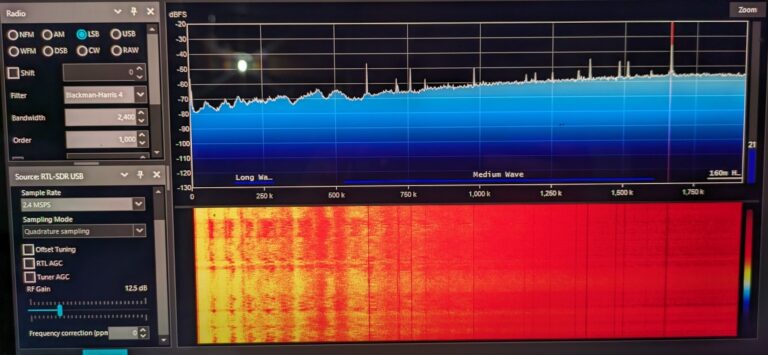
The interface shows you a spectrum display at the top and a waterfall below it. The waterfall is the view that hooks people. Watching signals appear as colored streaks moving downward in real time, seeing the FM band light up like a city skyline, noticing something unexpected moving through a frequency you didn’t know was active. That’s the moment SDR becomes a hobby instead of a project.
Plugins worth installing immediately: DSD+ for decoding digital radio, Radar plugin for displaying ADS-B aircraft data visually, and the Frequency Scanner for automatically hunting active channels.
Download free at: airspy.com/downloads
Best for: Windows users, beginners, anyone who wants a large plugin library.
SDR++ — Windows, Mac, Linux – my current daily driver
SDR++ is the newer option and in my opinion the better one for anyone who’s moved past the first week. The interface is cleaner, the performance is better on low spec machines, and it works identically across Windows, Mac, and Linux, which matters if you’re running a Raspberry Pi SDR station or bouncing between computers.
Where SDR# has plugins, SDR++ has modules built directly into the core software. Noise cancellation, frequency correction, and recording. It’s all there without hunting through third party downloads. The waterfall rendering is noticeably smoother and the CPU usage is lower, which matters if you’re running other software alongside it or on an old laptop.
The one downside: the plugin ecosystem isn’t as large as SDR# yet. For specialized decoding tasks like trunked radio you’ll still need external tools. But for everyday scanning, satellite reception, and aircraft tracking it handles everything cleanly.
Download free at: github.com/AlexandreRouma/SDRPlusPlus
Best for: Everyone once you’re past the basics. Mac and Linux users especially.
GQRX — Linux and Mac, open source
GQRX is the Linux community’s answer to SDR# and it’s excellent at what it does. Built on GNU Radio, it’s solid, well maintained, and handles every demodulation mode you’ll encounter as a beginner. If you’re on a Mac or running Linux as your daily driver, GQRX is where to start before you try SDR++.
The interface is slightly more minimal than the other two. Some people prefer the minimalism and others find it limiting. It does everything you need for basic scanning and listening without overwhelming you with options. For NOAA weather satellite reception in particular, GQRX has a dedicated APT mode that makes the process straightforward.
Windows ports exist but vary in stability. If you’re on Windows, use SDR# or SDR++ instead.
Download free at: gqrx.dk
Best for: Linux users, Mac users, anyone who values simplicity and stability over features.
Which one should you actually start with?
Windows: Start with SDR#. Get comfortable. Switch to SDR++ when you want better performance or start feeling limited.
Mac: Start with GQRX. Move to SDR++ when you want more features.
Linux: Start with GQRX or SDR++ — both are excellent, SDR++ has a slight edge in 2026.
Raspberry Pi: SDR++ runs well on Pi 4 and Pi 5. GQRX works too but uses more resources.
The hardware underneath the software
The software is only as good as what it’s receiving from. If you don’t have your dongle sorted yet, the RTL-SDR Blog V4 is the right starting point for most people.
→ RTL-SDR Blog V4 Dongle on Amazon (~$40)
→ RTL-SDR Blog Multipurpose Dipole Antenna Kit (~$20)
If you want an alternative with better direct HF sampling without an upconverter, the Nooelec NESDR SMArt v5 Bundle is worth considering. It ships with three antennas and covers 100kHz to 1.75GHz.
→ Nooelec NESDR SMArt v5 Bundle on Amazon (~$45)
One last thing
Whatever software you choose, your first session will involve some driver setup on Windows. run Zadig, install WinUSB, and follow the instructions at rtl-sdr.com carefully. It takes fifteen minutes and people who skip it spend hours confused about why nothing is working.
Do it once. Then tune to your local FM band, watch the stations light up across the spectrum display, and start exploring everything above and below it.
There’s a lot up there.
This article contains affiliate links. If you purchase through them I earn a small commission at no extra cost to you.