The beginner’s guide to RTL-SDR: what you can hear for $40 and a USB dongle
You don’t need a license, a tower, or a thousand-dollar radio. You need a $40 USB stick and a curiosity about what’s actually moving through the air around you.
By The Long Frequency · April 2026 · 8 min read
I remember the first time I plugged in an RTL-SDR dongle. It looked like a cheap TV tuner and that’s exactly what it started as. Someone figured out that the chips inside these USB sticks could be repurposed to receive a huge swath of the radio spectrum, and the SDR community was never the same.
Within twenty minutes of installing the software, I was listening to aircraft transponders, my favorite FM stations, and picking up a signal I still haven’t fully identified. I was hooked in a way I hadn’t been hooked on a hobby since I was a kid.
If you’ve been curious about software defined radio but figured it was too technical, too expensive, or required some kind of license then this guide is for you. It doesn’t. Here’s everything you need to know to get started.
What is RTL-SDR, exactly?
SDR stands for Software Defined Radio. Traditionally, radios are hardware with physical circuits tuned to specific frequencies, doing one job. SDR flips that model. The hardware just captures raw radio signals across a wide range of frequencies, and software on your computer does the actual work of decoding, filtering, and displaying what’s there.
RTL-SDR specifically refers to a family of cheap USB dongles based on the Realtek RTL2832U chip. These were originally sold as digital TV receivers in Europe. Hardware hackers discovered the chip could be put into a raw sampling mode that turns it into a general purpose radio receiver covering roughly 24 MHz to 1766 MHz. An enormous slice of the spectrum that includes aircraft, weather satellites, FM radio, amateur radio, maritime signals, and a lot of things in between.
The short version: For $40, you get a device that lets your laptop listen to almost everything broadcasting between 24 MHz and 1.7 GHz. No license required to listen. No monthly fees. No subscription.
What you’ll actually need
The dongle
The RTL-SDR Blog V4 is the one I recommend without hesitation. It’s purpose built for SDR use with better shielding, better components, and a software activated bias tee for powering active antennas. At around $40 it’s the sweet spot between price and performance. Avoid the no-name dongles on Amazon — they work, but the interference and noise floor make them frustrating for anything beyond casual listening. Also avoid RTL-SDR Blog V4 knockoffs.
→ RTL-SDR Blog V4 on Amazon (~$40)
What about an antenna?
The V4 does not ship with an antenna, so you’ll need to obtain that separately. If you’re just getting started and want to hear local signals like FM radio, aircraft transponders, or weather radio a simple wire dipole you make yourself works fine and costs nothing. There are good guides online for building one in an afternoon.
If you want to skip the DIY and get straight to scanning, the RTL-SDR Blog Multipurpose Dipole Antenna Kit at around $20 is the right call. It’s adjustable, works across a wide range of frequencies, and is designed specifically to pair with the V4. Most SDR hobbyists start here.
→ RTL-SDR Blog Multipurpose Dipole Antenna Kit on Amazon (~$20)
Together the V4 and the antenna kit come to about $60 — less than a dinner out, and you’ll be pulling signals out of the sky the same night they arrive.
This article contains affiliate links. If you purchase through them I earn a small commission at no extra cost to you.
Software
On Windows, SDR# (SDRSharp) is the standard starting point. The software is free, well documented, and has a huge plugin ecosystem. On Linux and Mac, GQRX is excellent. SDR++ is the newer option that works across all platforms and has a cleaner interface. All three are free.
What can you actually hear?
This is the question that gets people. Here’s what I listen to regularly from my desk in Kansas City with a basic antenna hanging in a window:
- Aircraft transponders (ADS-B) – every plane overhead, its altitude, speed, and flight number, in real time
- NOAA weather satellites — actual images of cloud cover transmitted directly from satellites passing overhead
- FM radio, obviously but you can see the entire FM band at once and watch signal levels visually
- APRS packets from ham radio operators and weather stations
- Maritime AIS signals if you’re near water
- ISS communications when it passes overhead
- Trunked public safety radio (with the right decoder and unencrypted signals)
- Weather balloon telemetry (radiosondes) — you can even chase and recover them
- A surprising number of things you won’t immediately recognize
That last one is half the point. The spectrum is busier than most people imagine. Once you can see and hear it, you start noticing signals that have been there your whole life, you just didn’t have ears for them.
Getting started: the first hour
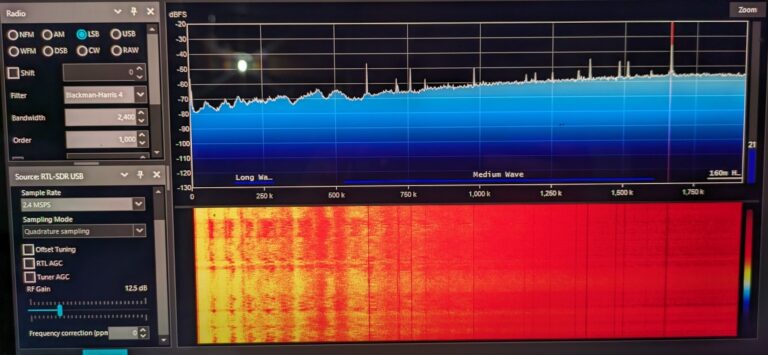
Install SDR# or SDR++. Plug in your dongle. Run the driver installer (Zadig on Windows the documentation on rtl-sdr.com walks you through it clearly). Open the software, set your sample rate to 2.4 MHz, and tune to your local FM band around 100 MHz. You should immediately see the FM stations light up as peaks in the spectrum display.
From there: tune to 121.5 MHz and listen for aircraft emergency beacons. Tune to 162.4–162.55 MHz for NOAA weather radio. Tune to 1090 MHz and install the plugin dump1090 or ADS-B Spy to start seeing aircraft. Each of these works with the dipole antenna kit on day one.
The rabbit hole warning: Set aside more time than you think you need for your first session. I sat down for “just an hour” and looked up at 2am. This is that kind of hobby.
Where to go from here
The RTL-SDR community is one of the most generous in amateur radio. The rtl-sdr.com blog has been running for over a decade and catalogs almost every use case imaginable. The r/RTLSDR subreddit is active and welcoming to beginners. The RTL-SDR Discord has people who will help you decode that mystery signal at midnight.
I’ll be writing a lot more about specific SDR projects here on The Long Frequency. Satellite reception, balloon chasing, what I hear from the Philippines when band conditions cooperate, and the stranger corners of the spectrum.
But for now: order the dongle. You’ll have it in a few days. Your first evening with it will remind you what it felt like to discover something for the first time.
That feeling is worth $40.